


FOX 4: DFW WAPP - Weather
3.82.60K Reviews
App Specs
- Version
- 6.2.520
- Updated On
- License
- Free
- Downloads
- 1,000,000+
- Developer
- Fox Television Stations, Inc.
- Categories
- Weather
- Platform
- Android, iOS
Screenshots
 Analysis by AppCompare
When I need to decide whether to carry an umbrella, change a route, or postpone an outdoor plan, I want more than a temperature on a screen. I want a quick sense of what the weather is doing nearby and a clear explanation of what may happen next. That local focus is the main reason I’d consider FOX 4: DFW WAPP - Weather: it is made for people following conditions around Dallas–Fort Worth, with radar and video forecasts giving the forecast more context than a single number can.
Why local radar changes the decision
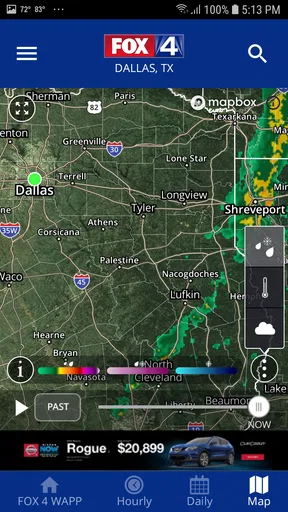
A forecast can tell me rain is possible, but radar helps me think about timing and movement. In practice, I’d use the map as a planning aid rather than a promise: check it before leaving, then look again if the sky changes or an outdoor plan depends on staying dry. That small habit is especially useful in a large metro area, where weather can feel different from one part of the day—or one part of the region—to another.
The useful distinction is between checking conditions and deciding what to do. A radar view can help me judge whether it makes sense to leave now, wait a little, or make a backup plan. It cannot guarantee that a particular street or destination will remain dry, so I would avoid treating a patch of color on a map as certainty. For important plans, I’d pair the visual view with the forecast and any active alerts.
How I’d use it during an ordinary day
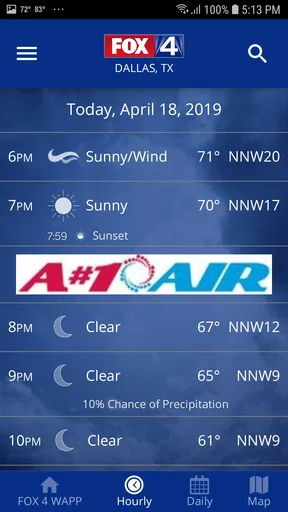
Imagine I’m getting ready to leave for work and have a walk or errand planned later. I’d check the current conditions first, then look at the radar before deciding whether to bring rain gear or move the errand earlier. If the weather looks unsettled, the hourly forecast gives me another way to compare the likely conditions across the day instead of making the call from the morning sky alone.
If a warning appears, I’d treat the notification as a prompt to check the details and adjust plans, not as background noise to swipe away. That is a practical way to use severe-weather alerts: keep the phone’s notifications available, but make the next decision based on the alert and the situation around me. People who routinely silence all app notifications may miss one of the more useful reasons to keep a local weather app installed.
Forecast videos add explanation, not just another screen
The video forecasts are valuable when I want a human explanation of the developing setup rather than only a list of conditions. I’d turn to one when a forecast seems complicated or when I’m trying to understand whether a change matters for the rest of my day. A quick video can put the outlook into plain language, while the radar and hourly view are better for a fast check.
That choice also makes the app easier to fit into different routines. If I have only a moment, I can look for the immediate weather information; if I have time to plan, I can watch the forecast and compare it with the map. I wouldn’t expect video to replace a glance at current conditions, though. It is most useful as context, not as the fastest answer to “Should I take a jacket right now?”
Worth Reading Before You Choose

EA SPORTS FC Mobile 26 Is a Bigger Football Game, but It Takes Time

Flipboard Shows What News Apps Must Do Beyond the Feed

Switching to Android Auto Means Rethinking Your Driving Routine

Google Calendar Makes a Crowded Week Easier to Manage

Ludo King Makes the Most of the Minutes Between Plans

Baby Panda World Brings Quick Play to Modern Phones, but Its Game Library Feels Busy
Where it sits among weather apps
Compared with a general-purpose weather app, this one has a clear local identity: FOX 4 Dallas coverage is the point, rather than an attempt to serve every city equally. That can be an advantage if I live in the region or visit often, because local forecasts and video explainers are more relevant to the decisions I make there. A broad weather service may be a better fit if I regularly need to compare many distant places or want one familiar tool for travel across several regions.
I’d also keep a standard phone weather app in perspective. It is often convenient for a quick temperature check, while a local app can be more helpful when I want regional context, radar, or a forecast explained by a local outlet. There is no need to choose one approach for every situation: the built-in option can handle a glance, and this app can be the deeper check before a weather-sensitive plan.
Good habits for getting more from the app
One useful habit is to check the forecast at the point when it can still change a decision. Looking in the morning before a long day out is more practical than checking only after rain begins. For plans that depend on a narrow window—walking the dog, setting out for an appointment, or spending time outdoors—I’d use the hourly outlook and radar together, then leave room for conditions to shift.
I’d also make the most important information easy to find through the app’s customization options. If wind or humidity affects what I’m doing, I’d prioritize those details rather than filling the first screen with numbers I rarely use. The aim is not to display everything; it is to make the one or two details that influence my choices quick to spot.
Who should choose it, and who may prefer another option
This is a sensible choice for Dallas–Fort Worth residents who want local weather information, appreciate video forecasts, and are willing to check radar before making plans. It can also help visitors who need a better feel for conditions during a stay. The app is free, is rated for Everyone, and comes from Fox Television Stations, Inc.; it has an average rating of 3.9 from around 8.7 thousand ratings, with more than a million installs.
I’d look elsewhere if I wanted a weather app built mainly around locations far from the Dallas–Fort Worth area, or if I prefer a bare-bones screen with no local media element. A traveler who moves between cities constantly may get more value from a service centered on saving and comparing many places. Likewise, anyone who does not want weather notifications should review notification settings during setup and rely on manual checks instead.
FOX 4: DFW WAPP - Weather is a weather app from Fox Television Stations, Inc., and its most useful distinction is the combination of local radar and video forecasts. I would not use a map as a guarantee or assume any forecast removes uncertainty, but I do find the pairing helpful when timing matters. The app is free, carries an Everyone age rating, and its current version is 6.2.402; it first arrived on February 24, 2012.
My practical recommendation is to use it as a local planning tool, not as a reason to stop checking the conditions around you. Open it before a weather-dependent outing, compare the hourly outlook with the radar, and use a video forecast when you need more explanation. If that matches how you make decisions, this is a useful addition to your phone; if you mainly need a quick glance for places across the country, a broader alternative may suit you better.
Ever found yourself caught in the middle of unpredictable weather, wishing you had a reliable app to keep you updated? Well, I recently downloaded the FOX 4: DFW WAPP - Weather, and let me tell you, it might just be the weather companion you’ve been looking for, especially if you're in the Dallas-Fort Worth area.
Getting Started with the App
First off, the installation process was smooth sailing. It didn’t take up much space on my phone, which is always a relief. Once you open the app, you’re greeted with a clean interface that’s super intuitive. No need to fumble around trying to figure out where everything is.
Features That Stand Out
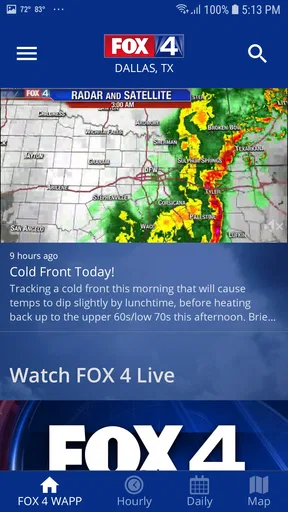
One of the features I found particularly handy was the live radar. You can see real-time weather movements, which is perfect for planning your day, especially if you’re trying to dodge a thunderstorm. The app also gives you hourly updates, so you're never caught off guard.
There’s also a nifty feature where you can set up alerts for severe weather conditions. This is a game-changer if you’re someone who likes to stay ahead of the curve. The app sends you notifications straight to your phone, so you’ll know if a storm is brewing or if there’s a heat advisory.
User Experience
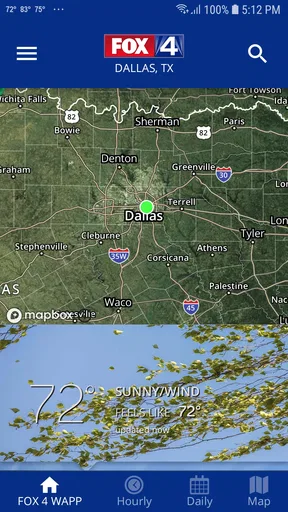
Navigating through the FOX 4: DFW WAPP - Weather is a breeze. It’s not cluttered with unnecessary ads, which is a huge plus. You get quick access to the current temperature, forecasts, and any active weather alerts.
Another thing I appreciated was the inclusion of video forecasts. Sometimes, you just want a more detailed explanation of what’s going on, and these videos do just that. They’re informative and to the point.
Customization Options
If you’re like me and like your apps to be a bit more personalized, you’re in luck. This app lets you customize your home screen with the weather data that matters most to you. Whether it’s the current temperature, humidity levels, or wind speed, you can prioritize what you see first.
Why You Should Consider This App
Now, if you’re living in the Dallas-Fort Worth area, this app is a must-have. It’s tailored specifically for this region, so the data is incredibly accurate. Plus, having the local weather team’s insights right in your pocket is pretty reassuring.
Even if you’re just passing through or planning a visit, having local weather updates can make your stay much smoother. Knowing whether to pack an umbrella or sunscreen can make all the difference.
Final Thoughts
In conclusion, the FOX 4: DFW WAPP - Weather is more than just a weather app—it’s a reliable companion that keeps you informed. With its user-friendly design, accurate updates, and customizable features, it’s definitely worth a download.
So, if you’re looking for a weather app that’s got your back rain or shine, give this one a shot. Who knows, it might just become your go-to for all things weather-related!
Pros
- Accurate weather forecasts for DFW area.
- Customizable weather alerts and notifications.
- User-friendly interface with easy navigation.
- Real-time radar and satellite imagery.
- Detailed hourly and weekly weather updates.
Cons
- Occasional ads can be distracting.
- Limited features without internet connection.
- Radar data may lag during peak times.
- App size is larger than some competitors.
- Minor bugs reported on older devices.
FAQs for FOX 4: DFW WAPP - Weather
What features does FOX 4: DFW WAPP - Weather offer?
FOX 4: DFW WAPP - Weather provides real-time weather updates, radar images, and forecasts tailored specifically for the Dallas-Fort Worth area. It includes severe weather alerts, hour-by-hour forecasts, and video updates from the FOX 4 meteorologists. The app also offers customizable alerts and interactive radar features to keep users informed of changing weather conditions.
Is FOX 4: DFW WAPP - Weather free to use?
Yes, the app is free to download and use. It offers comprehensive weather coverage without any subscription fees. However, users should be aware that it may include advertisements, which are standard in many free apps. These ads help support the app’s maintenance and updates, ensuring ongoing access to accurate weather information.
How accurate is the weather information provided by the app?
FOX 4: DFW WAPP - Weather is known for its reliable and accurate weather forecasts. The app sources its data from trusted meteorologists at FOX 4, who have extensive experience in weather reporting. The real-time radar and weather alerts help ensure that users receive the most current and precise information available for the Dallas-Fort Worth region.
Can I customize the alerts in FOX 4: DFW WAPP - Weather?
Yes, the app allows users to customize alerts based on their preferences. You can set notifications for specific weather conditions, such as severe storms, heavy rain, or temperature changes. This customization helps users stay informed about the weather conditions that matter most to them, enhancing the app’s utility and personalization.
Does FOX 4: DFW WAPP - Weather require internet access to function?
Yes, an internet connection is necessary for FOX 4: DFW WAPP - Weather to deliver the latest updates, radar images, and forecasts. While some features like stored forecasts may be available offline, real-time data retrieval relies on either Wi-Fi or mobile data connectivity to ensure accuracy and timeliness of the weather information.


